TeamSpeak 3 System Requirements
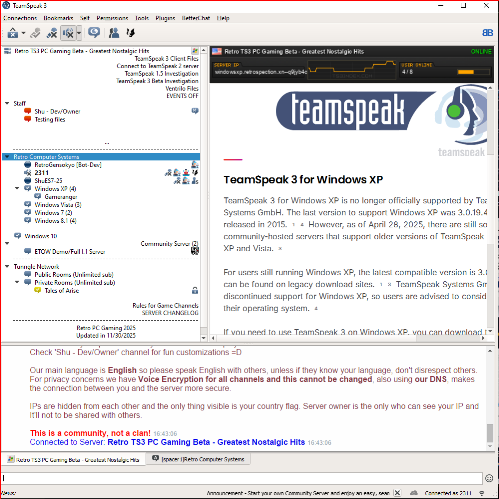
Please verify that your computer meets the minimum requirements before using TeamSpeak 3.
Actual requirements will vary based on your system configuration and the features you use. Processor performance is dependent upon not only the clock frequency of the processor, but the number of cores and the size of the processor cache. Disk space requirements for the system partition are approximate. Additional disk space is required for database storage and log files.
If you're looking for the minimum system requirements for TeamSpeak 2, click here.
Minimum Client Requirements
TeamSpeak 3 Client - Windows
- XP, 2003, 2008, Vista or 7
- SSE2 capable CPU
- The TeamSpeak Client requires around 20-60 MB RAM, depending on the number and size of the currently connected servers. Minimum 1 GB RAM recommended. Some operating system may require more RAM to run properly.
- 50-100 MB of disk space
- DirectX 8.1
- Internet connection
- Speakers and a microphone
TeamSpeak 3 Client - Mac OS X
- Mac OS X 10.6 or newer
- SSE2 capable CPU
- 128 MB of system memory (recommended: 512 MB or more)
- 75-150 MB of disk space
- Internet connection
- Speakers and a microphone
TeamSpeak 3 Client - Linux
- A reasonably modern Linux environment with libstdc++6. Note that Linux distributors may provide packages which have different requirements.
- Intel Pentium III, AMD Athlon XP, or any newer CPU (recommended: 800 MHz or faster)
- 128 MB of system memory (recommended: 512 MB or more)
- 25 MB of disk space
- X11 desktop environment (e.g. GNOME or KDE)
- Internet connection
- Speakers and a microphone
Mobile TeamSpeak 3 Client
Android
- Android 2.2.3 and above, ARM v7 CPU
- Google Play Store support
iOS
- iOS 6.1 and above
- Minimum iPhone 4 / iPad 2 / iPod Touch 4th generation
Possible Issues & Solutions
- I see 3 ways to connect on the TeamSpeak 3 server, which one I should choose?
| OS of choice | TeamSpeak 3 compatible versions | API Version | Optimal way to connect |
| Windows XP (Any service pack) | 3.0.18.2 to 3.0.19.4 | API 20 | Use TSDNS |
| Windows Vista (Any service pack) | 3.1 to 3.1.5 | API 21-22 | Use DNS |
| Windows 7 or later | 3.1.6 to 3.1.10 | API 22 | Use Server Nickname |
| iOS & Android | 3.0.19.3 to 3.1.9 | APIs already mentioned above | Use accordingly with the versions above |
Questions about TeamSpeak 3 on your Phone
- How can I use the Android/iOS versions?
We have a copy of the original APK for Android in our server, but iOS is missing still. If anyone still have the copy of that, let me know so I can archive it as well. (We don't promote piracy here in any shape of form, so in order to use the copy of our APK you need to buy TeamSpeak 3 on Google Play Store first) Anyway...
We recommend for latest Android versions to use TeamSpeak 3 version 3.1.9, since you probably already know each released version of Android it becomes less and less compatible with old apps and TeamSpeak is no exception. Modern Android versions might crash the app and the app itself can be very unstable in your phone. I tested the app using Android 12 and Android 13 and I had no issues using it.
Keep in mind because we're talking about the original APK here, Google Play will try to update the app to the latest version, if it does, then you will lose compatibility with our server and thus not be able to connect on it. To prevent that to happen set your Google Play Store to update apps manually and make sure to not update TeamSpeak 3 app in any circumstance.
If you still have old phones around, It might be ideal, since it will guarantee 100% compatibility with the app, if you choose a version already mentioned in the table above, of course.
Questions about TeamSpeak 3 on your Computer
- Installing both latest TeamSpeak 3 and old TeamSpeak 3 clients:
If you have latest TeamSpeak 3 version, only one TeamSpeak can be installed and opened at the time. The workaround for this is installing one version choosing "Recommended: Save in user own files" and in a specific folder location and for the other TeamSpeak 3 installation "Save inside the installation folder" and in a different specific folder location.
- How to block updating the client?
Any older TeamSpeak 3 version, It'll constantly ask to update, because the checks are hardcoded, even if you delete update.exe or block it, still will check for updates. What you have to do is go to this directory:
On Windows: %WINDIR%/System32/drivers/etc
On Linux: /etc
And find a file called hosts. Open the hosts.file and add these lines:
127.0.0.1 versions.teamspeak.com
127.0.0.1 files.teamspeak-services.com
So now every time TeamSpeak 3 check for updates it will fail, since it will check for the local IP, instead of main domain. Since the server won't be located locally, it will fail the check every time. In case you still want to update TeamSpeak 3, then just delete these lines or download the new client and update it manually.
(Keep in mind the latest version of TeamSpeak 3 v. 3.6.2 is only compatible with Windows 7 and beyond and thus It's not compatible with this server)
Note: For systems like Windows XP it might require access to Safe mode, before any modifications in the hosts.file file.
- Can I install both TeamSpeak 6 and this old TeamSpeak 3 client in a modern machine?
Yes! And It's very straight forward, since TS6 installs in a completely different folder in comparison to TS3. So there are no issues here, even the register path is completely different.
Connect to our TeamSpeak 3 Server
TSDNS: windowsxp.retrospection.xn--q9jyb4c
DNS: windowsvista.retrospection.xn--q9jyb4c
Server Nickname: Windows 7
Connect to our TeamSpeak 2 Server
DNS: ts2.retrospection.xn--q9jyb4c
Connect to our TeamSpeak Classic or Ventrilo Server
DNS: lrvent.retrospection.xn--q9jyb4c
(For Ventrilo use port 9820)